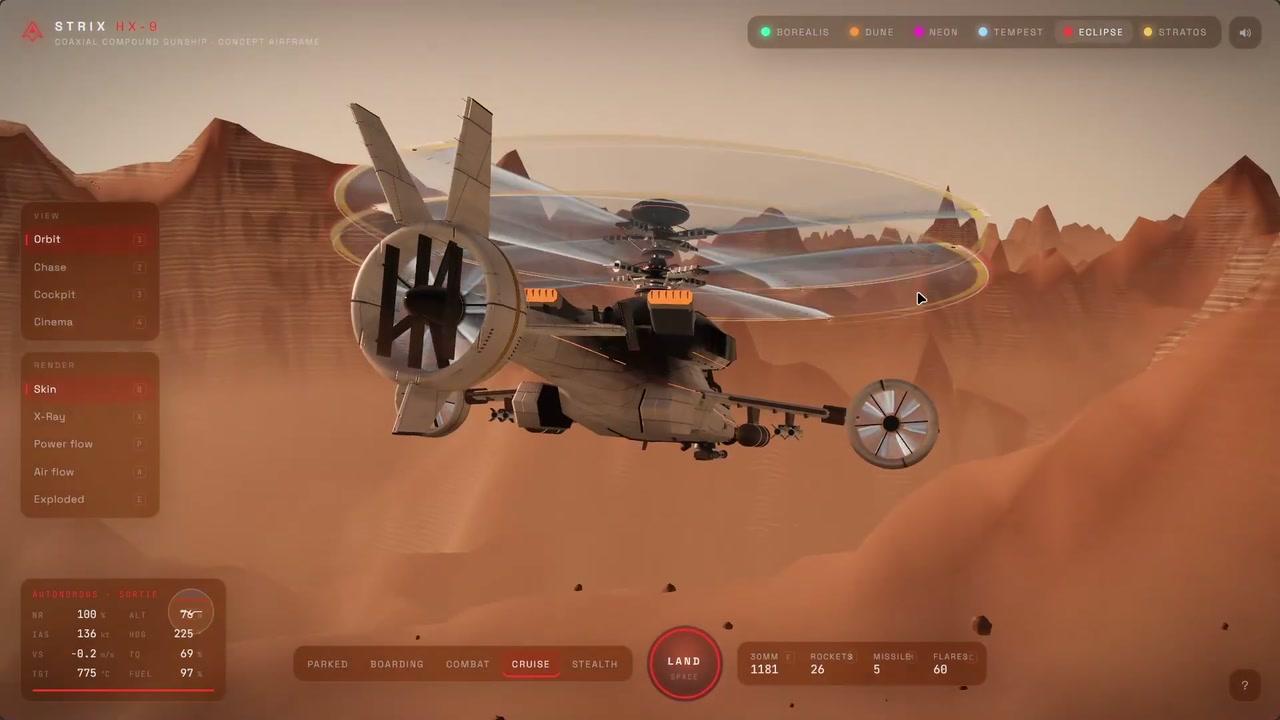
You inspect and launch a 3D concept gunship. You can change the camera, fire its weapons, and land it again.
The airframe flies over a rocky desert beneath spinning rotors. Instrument readouts track its flight, while different skies, x-ray, flow and exploded views let you look at its construction.
How it works
- Press Space to launch.
- Drag to orbit the camera and scroll to zoom.
- Switch views, skies and render modes to inspect the gunship.
- Hold F to fire the cannon, or use rockets, a missile and flares.
- Press Space to land.
Controls
| Input | Action |
|---|---|
| Flight and camera | |
| Space | Launch or land |
| 1–4 | Select Orbit, Chase, Cockpit or Cinema view |
| Drag | Orbit the camera |
| Scroll | Zoom |
| Appearance | |
| T | Switch to the next sky theme |
| Q/X/P/A/E | Select skin, x-ray, power flow, air flow or exploded view |
| Weapons | |
| F | Hold to fire the cannon |
| R | Fire rockets |
| M | Fire a missile |
| C | Release flares |
Features
- 3D coaxial gunship over a rocky desert
- 6 selectable sky themes
- Orbit, Chase, Cockpit and Cinema views
- X-ray, flow and exploded render modes
- Cannon, rockets, missiles and flares
- Flight instruments and labelled airframe parts
Comments