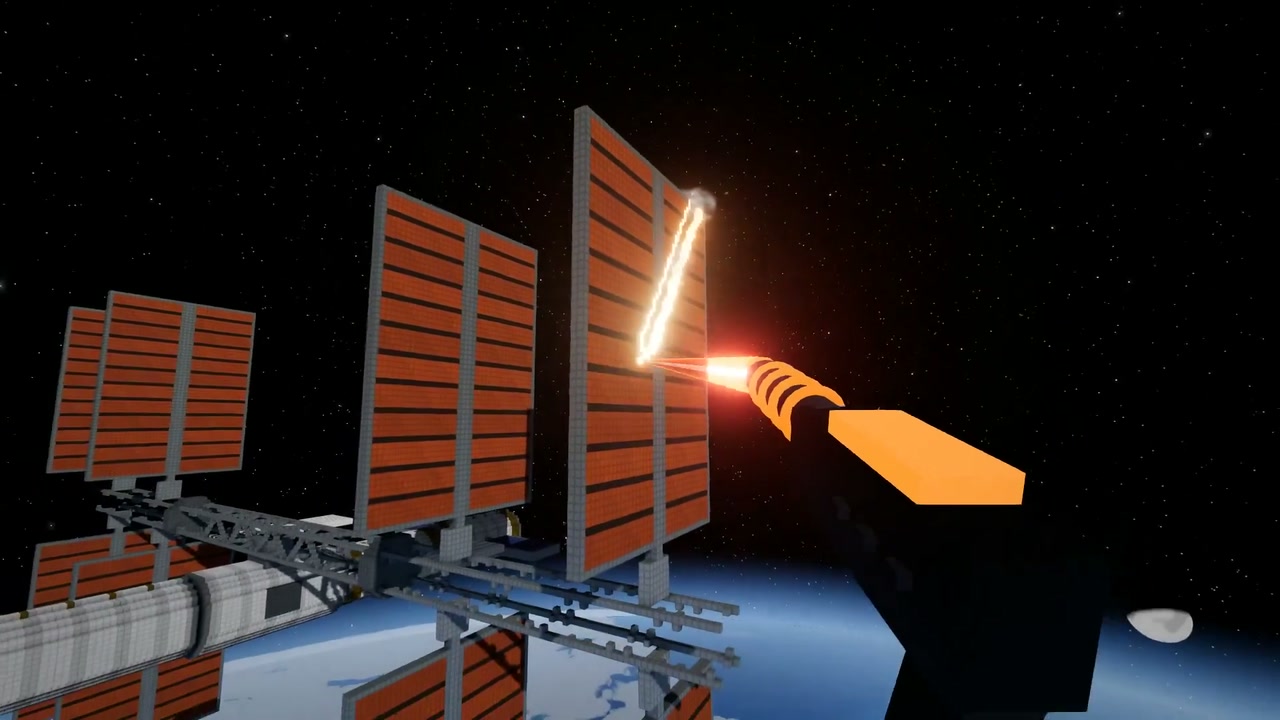
You enter a voxel world where you can cut, blast and topple structures. You can choose “City”, “Race track”, or “Space station”, then move around and use tools to break things apart.
Every voxel is a simulated body, so damaged structures can collapse. The space station hangs above a planet, with orange panels that break into pieces when you hit them.
How to explore
- Select a scene and press “Play”.
- Move through the scene and switch tools with the scroll wheel or tool wheel.
- Aim at a structure and use a tool to break it apart.
- Press R to rebuild the city.
Controls
| Input | Action |
|---|---|
| Mouse | Look around |
| Left click | Use the selected tool |
| Right click | Aim |
| WASD | Move where you look |
| Space/E | Rise while flying; Space jumps while walking |
| Q/C | Descend while flying; C crouches while walking |
| Shift/Alt | Move fast / slow; Shift sprints while walking |
| Scroll/Tab | Scroll switches tools; hold Tab for the tool wheel |
| F | Switch between flying and walking |
| X | Toggle slow motion |
| T/R | Change time of day / rebuild the city |
Features
- City, race track and space station scenes
- Hammer, laser, rocket, charge and wrecking ball tools
- Voxel structures that break apart and collapse
- Flying, walking and slow motion
- Graphics and look settings
Comments