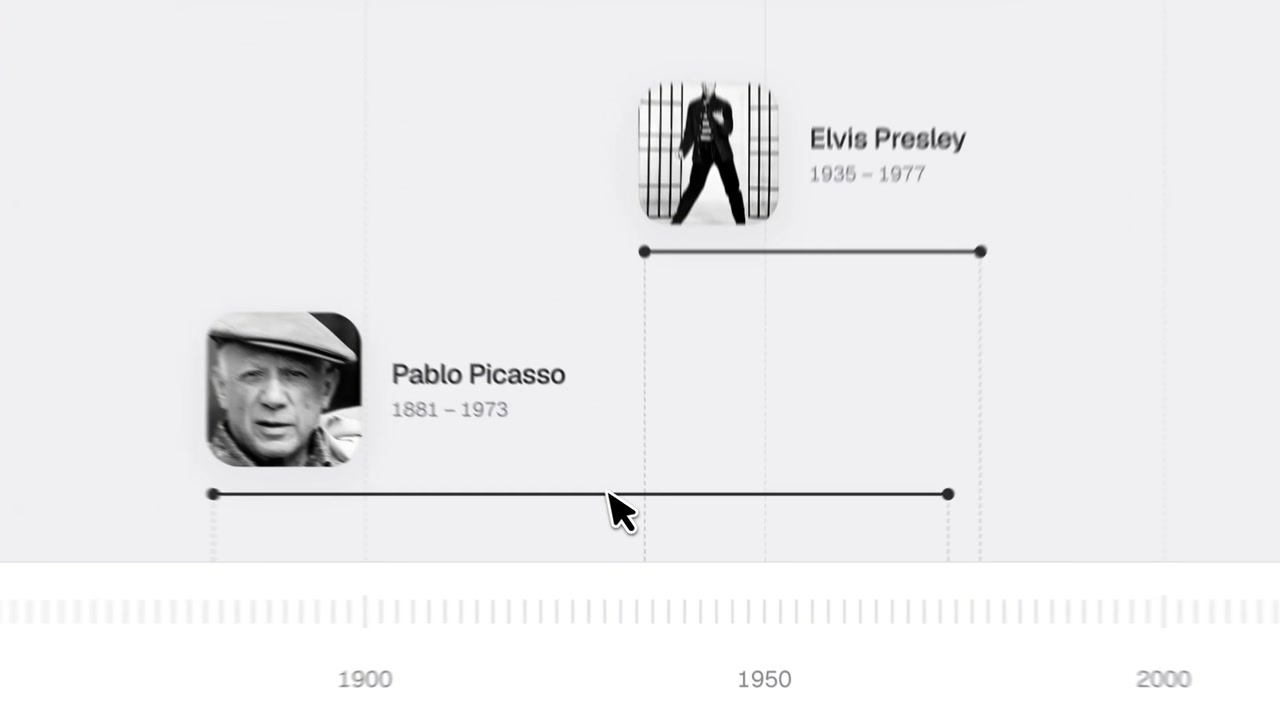
You add 2 people, events or eras to a timeline to see when they happened. You can compare how long they overlapped or how far apart they were.
Each entry has a dated line on a shared scale. Select 2 entries to see their relationship highlighted. In the example shown, the timeline marks 38 years of overlap between Elvis Presley and Pablo Picasso.
How to use it
- Select the field labeled “Add an event, person or era” to add entries.
- Select 2 entries on the timeline to compare their dates.
- Read the overlap or distance shown on the scale.
Controls
| Input | Action |
|---|---|
| Click “Add an event,personorera” | Add a person, event or era |
| Click a timeline entry | Select it for comparison |
Features
- Shared timeline with dated entries
- Images beside the example entries
- Highlighted span for overlapping dates
- Overlap duration shown in years
- Scale marked with years and BCE dates







Comments