Keep your AI video from changing worlds between shots
One shot has a brass door handle. The next has a silver one. The costume changes as the camera gets closer. I'd solve these problems as editing and reference problems first, before trying to write a longer prompt.

Decide what the viewer will notice
Build a short continuity sheet with the details that carry the scene: character silhouette, costume colors, important props, light direction and where the action happens in the frame. Include reference images, not just adjectives.
You don't need identical background leaves in every shot. You do need the key to remain in the same hand if the next shot is about unlocking a door. I would spend correction time on details the story asks the viewer to track.
Use the same approved references wherever the tool supports them. Keep a record of which reference produced each selected take so you can return to a working setup.
Keep movement understandable
If your explorer walks toward the right edge of one frame, a following shot moving left can feel like a reversal. Sometimes that's intentional. If it isn't, use your storyboard to keep the screen direction consistent.
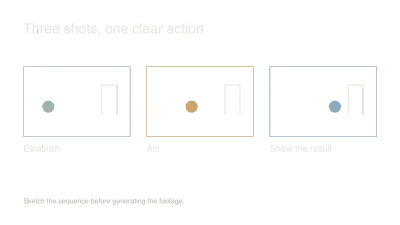
A useful sequence can be wide shot, close-up of the hand, then a view through the opening door. The close-up gives you an editing bridge and avoids demanding a perfect match between two complicated full-body performances.
I'd also check the start and end of each selected clip at reduced speed. Small object changes often happen exactly where you were planning to cut.
Choose the least expensive repair
Try trimming away the unstable frames. Then try a different cut point, a reaction shot or a detail insert. Regenerate when the inconsistency affects the action and these edits can't hide it without making the scene confusing.
Don't repair every mismatch with a dissolve. Blending two incompatible images can make the transformation more visible. A clean cut at a clear action is often easier to follow.
Review the finished sequence at normal speed after every repair. The goal is a scene that feels coherent while watching it, rather than a collection of individually flawless still frames. Keep a few notes on recurring failures for the next shoot plan.
Watch and learn
Companion videos from other creators. Interfaces and versions may differ from your project.
Introducing Runway Gen-4Runway · YouTubeOfficial model introduction with visual examples, rather than a complete game-trailer tutorial.Sources and further reading
- Runway: Gen-4 video prompting — accessed Sep 9, 2026
Make something of your own
Describe an idea and play it in minutes.
Create